 Practice Studio
Support
Something not working, or have an idea? We'd love to hear from you.
Contact
Email ownstreamapp@gmail.com. Please tell us your device (for example "iPhone 15" or "iPad Air") and what you were doing when the problem happened.
If the app is used by a child, we ask that a parent sends the email.
Send a problem report from the app
- Tap Report in the app's menu. You can also find Report a problem at the bottom of the tuner settings.
- Write what went wrong, in a few words.
- If it helps, turn on Attach my last recording. It's off unless you turn it on.
- Tap Send. Mail opens with the report ready. Check it, then send it. If Mail isn't set up, the share sheet opens instead, and you can pick another email app.
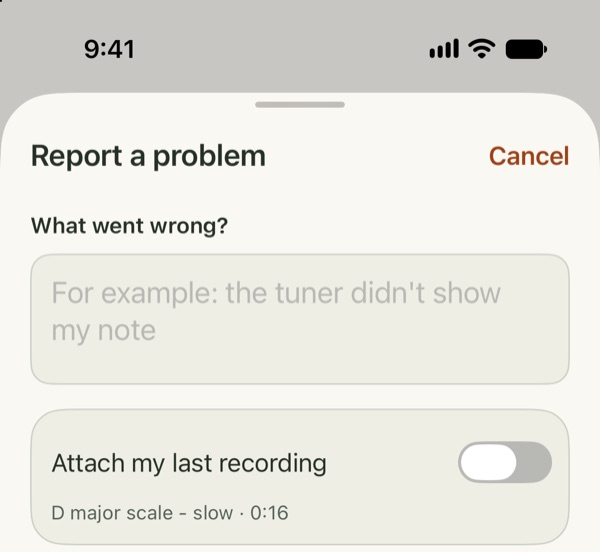
The report includes your device model, iOS and app version, and a short log of what the app did recently. It never includes sound unless you attach a recording. What exactly is sent.
Report is in beta build 17 and later. On an earlier build, update in TestFlight, or just email us.
Questions
The tuner or recorder doesn't hear anything
The app needs microphone access. If you tapped "Don't Allow" the first time, the app shows Microphone access is off with an Open Settings button. Tap it and turn on Microphone.
You can also go to Settings › Apps › Practice Studio and turn on Microphone. Then go back to the app.
Tips for steadier tuner readings
- Pick your instrument first. It sets the note range and the strings or reference notes.
- Play one note at a time and hold it steady for a moment. Bow or blow evenly.
- Keep the phone or iPad close to the instrument, in a quiet room. Other instruments nearby can confuse the reading.
- If your orchestra or teacher tunes to a different A (for example 442 Hz), change A4 in the tuner settings.
- Clarinet, saxophone, trumpet, horn and other transposing instruments: choose Written to see the note as it's written in your music, or Concert to see the sounding pitch.
Where are my recordings?
In the app's recordings list, and in the Files app under On My iPhone (or On My iPad) › Practice Studio. They are stored only on your device.
I deleted a recording by mistake
Open Recently Deleted in the recordings list. Deleted recordings stay there for 30 days before they are removed for good.
Does the app need the internet or an account?
No. Everything works offline, and there is no sign-up. See the privacy policy.
Which devices are supported?
iPhone and iPad with iOS 18 or later. During the beta, install it through TestFlight.